


All Document Guide
3.813.00 Reviews
App Specs
- Version
- 1.1.0
- Updated On
- License
- Free
- Downloads
- 1,000,000+
- Developer
- XuanLong Studio
- Categories
- Productivity
- Platform
- Android
Screenshots
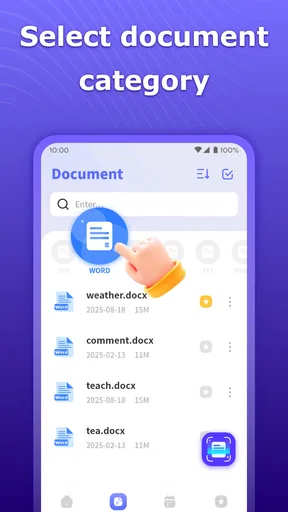
 Analysis by AppCompare
All Document Guide is the kind of productivity app that makes a modest promise: it aims to help with everyday document work rather than replace a full desktop office suite. I approached it as a practical tool for quick reference and basic document handling, and my first impression was that its appeal comes from simplicity. If you regularly receive unfamiliar files, need a quick reminder about document formats, or want one place to begin before choosing a more specialized tool, it can earn a place on your phone.
That usefulness depends heavily on your expectations. This is not an app I would choose as the central workspace for a long report, a complex spreadsheet, or a team editing project. Its store summary points toward basic document processing, while the short description presents it as an all-document guide. Those words matter: I see it more as an accessible starting point and reference companion than as a complete replacement for established office software.
From first-week curiosity to a practical routine
During the first week, an app like this benefits from a very clear use case. A new user may open it after downloading an unfamiliar document, wondering which application can handle it or what the format is normally used for. That small moment is where All Document Guide feels most approachable. Instead of treating document work as something reserved for a laptop, it gives the phone a more useful role in the process.
I also like the fact that it is free. That removes the biggest barrier to trying it for a short task, especially when I only need occasional help rather than a permanent office subscription. The Everyone content rating makes it suitable for a broad audience, including students, casual users, and people who want a straightforward document companion without committing to a paid service.
The developer behind the app is XuanLong Studio, and the current release is version 1.1.0. It runs on Android devices using version 6.0 or later, which gives it a wide practical reach for people who keep an older phone as a backup or do not upgrade frequently. I would still judge the experience on the specific device, because document tools can feel very different on a compact screen compared with a larger phone or tablet.
One useful way to test it is to bring a real, low-risk task rather than browsing without a purpose. For example, imagine receiving a document from a school group or a local organization. I would first use the app to understand what kind of file I am dealing with, then decide whether I need a dedicated reader, editor, converter, or cloud service. That workflow prevents a common mistake: installing several unrelated apps before understanding the document itself.
Another practical habit is to use it before opening a file that contains important information. I would identify the format, check whether the intended action is simply reading or whether editing is required, and only then move to a more capable application if necessary. This makes All Document Guide valuable as a decision step. It can reduce trial and error, even when it is not the final tool used to complete the job.
Worth Reading Before You Choose

Flipboard Shows What News Apps Must Do Beyond the Feed

Switching to Android Auto Means Rethinking Your Driving Routine

Google Calendar Makes a Crowded Week Easier to Manage

Ludo King Makes the Most of the Minutes Between Plans

Baby Panda World Brings Quick Play to Modern Phones, but Its Game Library Feels Busy

ESPN’s Live Game View Makes Following Close Games Easier
The app has also attracted a substantial audience, with more than a million installs. Its average rating sits at 3.6 from roughly four thousand ratings, so the public response is mixed rather than overwhelmingly enthusiastic. I read that combination as a warning to keep expectations realistic: many people may find the basic idea useful, while others may want deeper document features than a guide-oriented app is designed to provide.
Who gets the most from it
I think All Document Guide suits people who are still building confidence with documents. A student who moves between notes, assignments, downloaded reading material, and shared files may appreciate a simple reference point. The same applies to a family member who understands how to use a phone but does not know why different document formats need different tools.
It can also help occasional users who do not want to memorize the purpose of every file type. If document work is only a small part of your week, keeping a lightweight guide nearby can be more convenient than searching the web each time. The benefit is not dramatic, but it is repeatable: the app shortens the path from “What is this?” to “What should I do next?”
I would be more cautious about recommending it to office workers who need advanced editing, tracked changes, detailed formatting, spreadsheet formulas, presentations, or reliable collaboration. Those users are usually better served by a mature office suite connected to their existing files and accounts. All Document Guide may still be useful alongside that suite, but I would not make it the main productivity environment.
The difference between a guide and a full document suite
The usual alternatives fall into two broad groups. Full office apps are built around creating and editing content, while file managers and dedicated viewers focus on opening, organizing, or sharing files. All Document Guide occupies a different position. Its strongest role is helping a person understand document handling before selecting the right specialist tool.
That distinction is important because it changes how I measure success. A full office app earns its place by supporting frequent production work. A guide earns its place by being available at the right moment and reducing confusion. If I open it several times during a month to identify formats or decide on a workflow, that may be enough value. If I need to write and revise documents every day, I would quickly reach for something more powerful.
There is also a trade-off in keeping a separate guide installed. Android already offers search, file browsing, and access to many document apps. For experienced users, looking up a format or opening it directly may be faster. The app therefore has to remain clear and useful over time; otherwise, it risks becoming an icon I remember only when I am already frustrated.
What remains useful after the novelty fades
After the initial curiosity wears off, I find the best reason to keep All Document Guide is its role in those small moments when a file creates a question rather than a task. I would use it to decide what kind of help I need before choosing a reader or editor, then notice which questions keep coming up. That habit can make my document setup simpler over time, which leads naturally to considering how the app’s current stage may shape its usefulness next.
Month-to-month value comes from repeated decisions
The long-term value is not in opening All Document Guide for entertainment or exploration. It comes from recurring document situations: downloading a file from a message, receiving an attachment from a school or workplace, moving material between devices, or helping someone else understand a file. These moments are irregular, but they are common enough for the app to remain relevant if its guidance is easy to reach.
I would build a small personal routine around it rather than checking it randomly. When an unfamiliar document arrives, I would use the guide to identify the format and clarify the next action. When I discover that I repeatedly need editing or conversion, I would stop treating the guide as the solution and use it instead as a reminder that a dedicated tool belongs in my regular setup.
That is one of the more useful insights here: the app can expose gaps in your document workflow. If I keep opening it to ask the same question, the answer may not be to browse the guide again. It may be time to organize my files better, choose one dependable reader, or install a specialist editor. In that sense, its recurring value can be diagnostic as well as practical.
A second insight is to separate “understanding a file” from “trusting a file.” A guide can help me decide what a document appears to be used for, but I would still handle unknown attachments carefully and avoid treating familiarity with a format as proof that a file is safe. For important documents, I would confirm the source and keep an original copy before changing, moving, or converting anything.
A third useful workflow is to use the app as a bridge for less technical users. If a friend or relative asks why a document will not open, I would first identify the format with them, explain the next step in plain language, and then recommend the smallest suitable app. This is better than immediately sending them a large office suite they may never understand or use.
For students, the app may be most useful at the beginning of a project rather than during writing. I would use it to understand the files received from a teacher, determine which ones are for reading, and identify which require editing or submission. Once that process is clear, a dedicated notes or office app can handle the actual work. This keeps the guide in a supporting role instead of forcing it into a job it was not meant to do.
Maintenance is light, but attention still costs something
The maintenance burden appears low because the app is free and designed around a focused document purpose. I would not expect to manage a subscription or rebuild a complicated workspace every month. That makes it easier to keep installed as a backup reference, especially on a device with enough storage for occasional utilities.
Still, low maintenance does not mean zero maintenance. I would periodically ask whether I am actually using it or merely keeping it because it might be useful someday. An app that sits untouched for months can become less valuable than a saved note explaining the few document formats I use most. The right test is simple: when a real file appears, does this app help me choose the next step faster than my existing tools?
Version 1.1.0 also suggests that I would pay attention to how the app develops before making it central to my workflow. A basic guide can remain useful if its information stays clear and its navigation remains dependable. But document habits change, Android devices change, and users often need more than explanations. I would keep a capable alternative available for important work rather than relying on one lightweight app for every situation.
Where fatigue can set in
The main source of fatigue is the gap between the promise implied by “all documents” and the narrower role of a basic guide. A person may install it expecting a universal reader, editor, converter, and organizer. If the actual experience is primarily educational or introductory, that expectation can lead to disappointment even when the app performs its intended job reasonably well.
Another point of friction is repetition. Once I understand the formats I encounter most often, I may have little reason to return. The app needs to offer enough practical clarity to justify that occasional revisit, but not every user will need a guide after the first few sessions. This is why I would not recommend installing it simply because the phrase “all documents” sounds comprehensive.
Small-screen productivity can also become tiring. Even when an app explains a document type clearly, reading instructions and then switching to another application adds steps. For a one-off question, that is acceptable. For a daily office workflow, the repeated handoff can feel slower than using a single established suite that already combines viewing and editing.
There is a further trade-off for people who keep many productivity apps. A guide can reduce confusion at first, but it can also add another place to look. I would keep it near my file manager or other document tools only if its role is obvious. If I have to remember which app explains a format, which app opens it, and which app edits it, the organizational benefit starts to disappear.
For that reason, I would skip All Document Guide if I already have a dependable document suite and rarely encounter unfamiliar formats. I would also skip it if my priority is advanced creation, collaborative editing, or a polished work environment. In those cases, the usual alternatives offer a more direct path from opening a file to finishing a task.
My long-term verdict
After the first-week appeal fades, All Document Guide earns lasting space only for a specific kind of user: someone who regularly needs help understanding document formats and choosing the next tool, but does not want to pay for that guidance. Its free access, broad age suitability, and support for Android 6.0 or later make trying it easy. The large install base shows that the problem it addresses is familiar to many phone users, while the 3.6 average suggests the experience will not satisfy everyone equally.
My recommendation is to treat it as a reference companion, not as an all-purpose office replacement. Install it when unfamiliar documents are a recurring source of confusion, use it to build a clearer workflow, and keep a dedicated reader or editor for the actual work. That approach gives the app a realistic job and avoids judging it by standards meant for a completely different category of product.
The strongest reason to keep it is practical reassurance. When a file arrives and I do not immediately know what to do, a focused guide can save time and prevent random app-hopping. The weakest reason is the hope that one lightweight download will handle every document need. It is better suited to explaining the road than driving the entire journey.
So, would I recommend All Document Guide to a friend? Yes, if that friend often asks what a document format means, needs a simple starting point, or helps other people with phone-based files. I would point an experienced office user elsewhere, especially when editing, collaboration, or dependable daily production matters more than basic guidance. Its lasting value comes from reducing uncertainty, not from replacing the tools that finish the job.
Pros
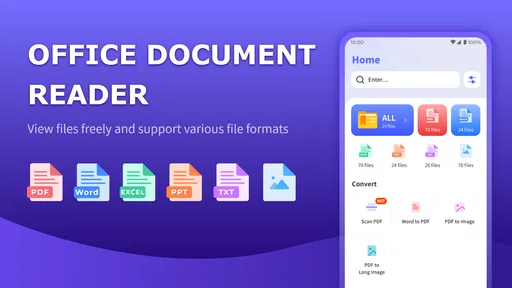
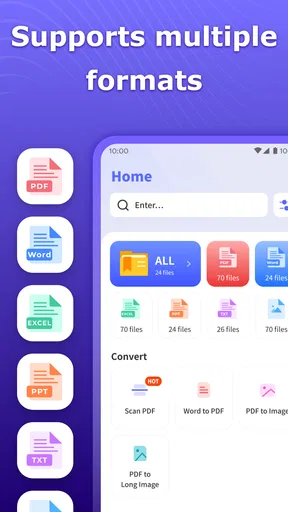
- Covers common document formats and office file types in one guide.
- Helpful for beginners who need quick explanations of document tools.
- Simple layout makes information easy to browse and understand.
- Useful reference for students
- office workers
- and everyday users.
- Can help users learn basic document terminology without technical jargon.
Cons
- Content may feel too basic for experienced document or office-suite users.
- Information quality depends on how often the guide is updated.
- May not provide detailed solutions for advanced formatting problems.
- Some topics could require another app to complete the actual document task.
- Ads or limited features may affect the reading experience
- depending on the version.
FAQs for All Document Guide
What is All Document Guide, and what can I use it for?
All Document Guide is designed to help users access, organize, and work with different types of documents from one place. Depending on the version and available features, it may support viewing common files, finding document-related information, and managing files more conveniently. It can be useful for students, office workers, and anyone who regularly handles digital documents on a mobile device.
Is All Document Guide free to download and use?
The application may be available to download at no initial cost, but some tools or content could depend on advertising, in-app purchases, subscriptions, or platform-specific limitations. Before installing, check the app store listing for the current pricing details and subscription terms. Also review whether premium features are required for the document formats or functions you intend to use most frequently.
Which document formats does All Document Guide support?
Support for document formats can vary according to the app version, operating system, and the tools included in the installation. Users should verify the official store description before downloading if they need to open formats such as PDF, Word files, spreadsheets, presentations, images, or compressed documents. Testing a copy of an important file first is recommended, especially for complex layouts or protected documents.
Does All Document Guide require an internet connection?
Some functions may work offline after the application and files have been installed on your device, while other features could require internet access. Online connectivity may be necessary for downloading documents, synchronizing content, displaying advertisements, accessing external resources, or receiving updates. If offline access is important to you, check the app permissions and test the features you need before relying on it while traveling.
Is All Document Guide safe to install and use?
As with any document-related application, users should download All Document Guide only from a trusted official app store and review the permissions requested during installation. Be careful when opening confidential files or granting access to device storage, cloud accounts, or personal information. Avoid uploading sensitive documents unless the app clearly explains how data is handled, stored, and protected in its privacy policy.


